What is the 20 vs 1 meme?
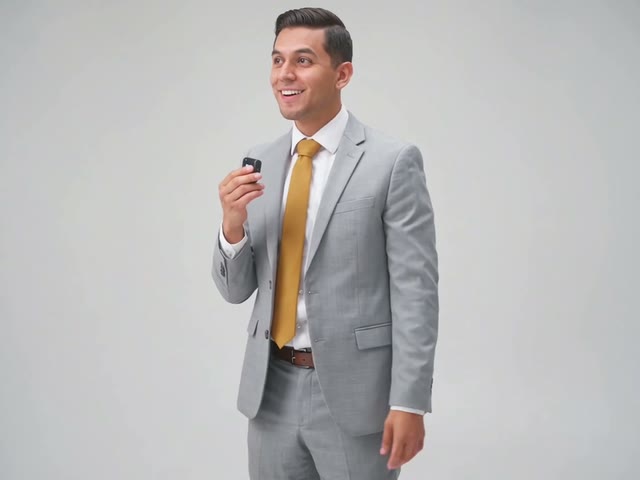
The 20 vs 1 meme is the opening of a mock tutorial: under eight seconds of quick alternating shots on a seamless white backdrop, two men, a young one in a light-grey suit and an older one in a burgundy sweater, each doing the same sly routine. Its AI version is often called 20 vs 1 AI.
Shot one: the older man, white hair and a neat moustache, stands side-on with his fingers at his lips, giggling, then swings one arm up over his head and points down, as if showing you where to look.
Shot two: the young man in the suit holds a small black gadget up to his mouth with a smug look, turns his back to the camera and glances over his shoulder, checking that nobody is watching.
Shot three back to the older man, biting back a laugh behind his hand; shot four to the young man again, now grinning openly, the gadget still at his mouth, taking a little step toward the camera.
The last shots cut between them faster and faster: one more cheeky smile from the young man, and the older man ending on a finger pressed to his lips, eyes sparkling, as if the secret is safe with him. It comes with the trend’s own sound, cut exactly to those shots.
People post the 20 vs 1 meme before any “how to” they should not be teaching: how to leave work early, how to eat the last slice, how to win an argument with twenty people at once. It works best with two people who look like they are in on it together.
MemeParrot's 20 vs 1 AI version follows our own AI-made recreation with AI-generated adults, so nobody from the original clip is in it.
Also searched as: 20 vs 1 meme, 20 vs 1 ai, 20 vs 1, 20 vs 1 trend, 20v1 meme, 20 vs 1 ai video.
Your 20 vs 1 video
With our 20 vs 1 AI generator photo one becomes the man in the suit and photo two the man in the sweater; leave box two empty and our AI character keeps that part. Everyone keeps the face, hair and clothes in their photo; the white studio, the cuts and every gesture come from our recreation. You get the 4:3 video with the trend’s sound, ready to post.
This meme works without sound.
How to make the 20 vs 1 meme with AI
- 1Upload one clear, waist-up photo of you, plus one for each pal you want in it. Everyone must be an adult: you or someone who agreed.
- 2Tick the consent box and start your video.
- 3In about 3 to 10 minutes your video is ready to download and post on TikTok, Reels or Shorts.
New to meme videos? Read how to make a meme video
What you upload and what you get
- You upload
- Man in the suit · Man in the sweater (optional)
- You get
- A 8-second 4:3 video in 720p, no watermark
- Sound
- The meme's own sound, ready to post
- Price
- 50 credits
- Ready in
- About 3 to 10 minutes
Photo tips for the 20 vs 1 meme
- One person in each photo, never a group shot.
- Head to toe if you can, since each shot shows one of you standing on the white backdrop.
- Facing the camera, with the eyes and mouth easy to see.
- Daylight or good indoor light, and no heavy beauty filter.
- No sunglasses, hats, masks or hands over the face.
- Only you, or adults who said yes to being in the video.
Common problems and fixes
- A photo was refused: we check every photo before making anything, and photos of children, public figures or unsafe content are turned down. Pick another photo of an adult who agreed.
- The face does not look like me: use a sharper, front-facing photo in even light. Side angles, small faces and filters give the AI less to go on.
- The wrong person is in the suit: the photos are in the wrong boxes. Make it again with the suit part first and the sweater part second.
- Two sounds play at once: you added a trending sound on top in the app. Turn it off, because the video already has its own.
- The video failed: the credits come back to your account automatically, and you can try again.
20 vs 1 meme AI: questions
How many photos do I need?
One is enough: you play the man in the suit and our AI character plays the man in the sweater. Add a second photo to put a friend in that part.
What photos work best?
One adult per photo, head to toe if you can, facing the camera in even light. Each shot shows one of you on a white backdrop, so a clear, sharp photo shows up well.
Does the video come with the sound?
Yes. Your video comes with the trend’s original sound, already in time with every cut, so you can post it as it is.
Are the people from the original clip in it?
No. Your video follows our own AI-made recreation, played by AI-generated adults, and the people in it are you and your friend.
Do I keep the suit or the sweater in the 20 vs 1 meme?
No. Everyone keeps the clothes in their photo. The white studio, the cuts and every gesture come from our AI-made recreation.
How do I make a 20 vs 1 AI video?
Use the generator at the top of this page: upload one clear photo of yourself, plus one of a friend if you want them in it, confirm that everyone in the photos is an adult who agreed, and press the button. You never write a prompt or upload a video. It is usually ready in 3 to 10 minutes; you can leave the page, it waits in My videos and we email you when it is done.
How long is a 20 vs 1 AI video, and which format is it?
20 vs 1 AI: 8 seconds, 4:3. It comes with the meme's own sound, and your own voice is never used.
How much does a 20 vs 1 AI video cost?
50 credits, paid once with no subscription. You see the price before you start, and a video that fails gives its credits back automatically.
Is MemeParrot affiliated with the original video?
No. MemeParrot is an independent tool, not affiliated with the people in the original clip, its makers or the sound it uses. Every video is our own AI-made remake with fictional AI characters. Only upload your own photo or one of an adult who agreed, never a celebrity or a child.
MemeParrot is an independent fan tool, not affiliated with the people in the original video, TikTok or YouTube. Every video is our own AI-made remake with fictional AI characters, marked as AI-generated. Added October 29, 2026.